
Check MEPCO Bill Paid Status – Complete Online And Offline Guide
I have seen that many people are worried about their MEPCO bill and want to know if it has been paid or not. If you recently made a payment or want to verify an old bill, this guide explains all online and offline ways to check bill paid status quickly and safely.
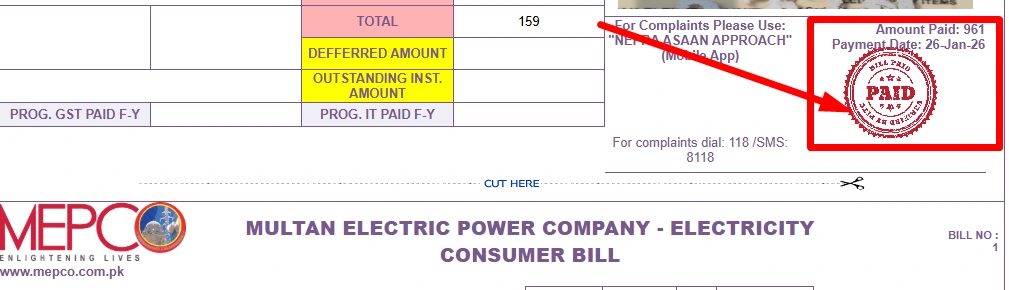
You can check your bill payment status online in a few seconds easily because the online checking makes everything clear, fast and easy. We will guide you and make sure you get the correct information.
How To Check Mepco Bill Paid Status?
You can check bill paid status through:
| No | Methods |
| 1 | Mepco official website or app |
| 2 | SMS service, 8334 |
| 3 | Mepco helpline |
| 4 | Customer service center |
| 5 | Bank Apps, HBL, UBL, |
| 6 | Other Mobile Apps, Jazz cash, Easy paisa or Daraz Wallet |
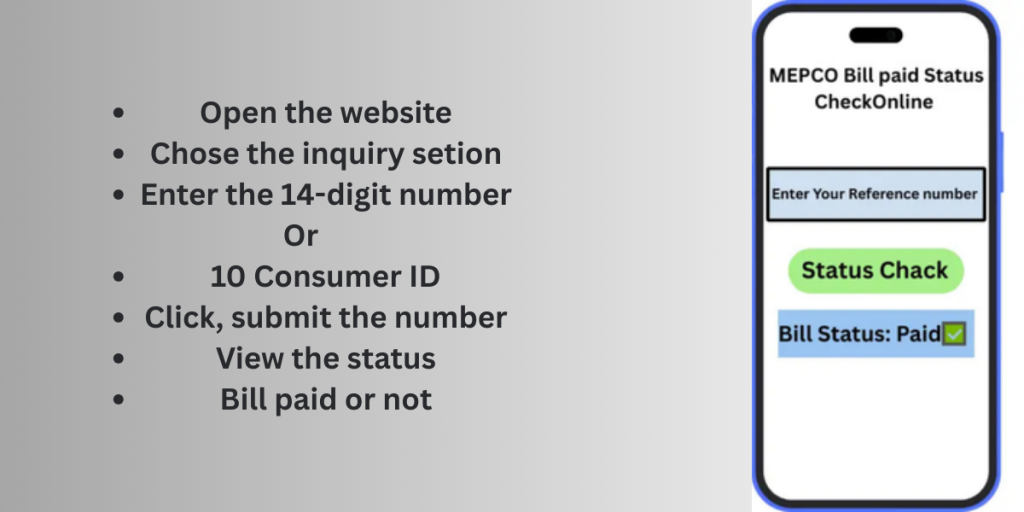
Through website
You can check your Mepco bill paid status by following these simple steps given in info graphic below
Through Mobile Apps
- Download MEPCO App: Install the official Mepco smart app from Google Play Store or Apple App Store.
- Open Mepco app login: Your email account number or consumer ID to use access your profile.
- Go to Bill Status: View your bill status in the mobile app menu.
- Enter this if needed: Enter your 14 digit reference numbers.
Check your status: The app will show if your bill is paid or unpaid along with payment date and amount.
Via Mobile Wallet Apps
- Easy paisa and Jazz Cash:
Open the app → bill payment section → select Electricity (MEPCO) and enter your 14-digit reference number. It show you the bill’s basic details along with the current payment status - Daraz App:
- Open the Daraz app → go to Bills and Top-Ups → choose Electricity Bills → select MEPCO and enter your reference number.
Through Banking Apps
- Log in to your bank’s app.
- Go to the payments section.
- Select the option to check your electricity bill and enter your reference number.
- You will be able to see your bill’s basic information like amount and due date.
Through MEPCO SMS Service
MEPCO also gives bill details to its users through SMS. So, easily you can get your bill through SMS, to receive your bill information via SMS you just Type ‘pitc<space>14 digit reference numbers and send it to 8334. If you want to learn the complete process, check the MEPCO Bill SMS & Email Registration guide.
Via Offline Method
If you have paid your bill at a bank, JazzCash or Easypaisa center, always keep your payment receipt safe. Make sure it has a signature and stamp, as it serves as proof in case of any payment related issues with the center.
Safety Tips Of Checking Status
Whenever you check the bill, its status and any related information, always keep these simple points in mind.
- Printed a copy of your paid bill or receipt. If your bill is not paid, visit the full guide, how to pay MEPCO bill.
- You can always use MEPCO official or trusted like ebil.pk
- Never share your personal information and your bank passwords with unknown websites.
- Visit or contact the Mepco Helpline whether you are confused about your information or details.
Benefits Of Checking Bill Paid Stust Online
There are some important benefits of checking bill status online.
- Quick and simple: you can check your paid or unpaid status in seconds without visiting any office.
- Payment Records: Easily check your monthly bill history online.
- Disconnection: Checking your due date status helps you avoid unexpected disconnection.
- Late fee: Check unpaid bills easily and pay it on time to avoid extra charges.
- 24/7 access: you can verify your bill anytime at night or holiday.
- No long wait: no need to call customer service or stand in long lines for details.
- Instant updates: Online systems show your latest payment status immediately after it is updated.
- Other Convenience: All details due date units charges are available easily in one place.
What to Do If Bill Payment Status Does Not Updated?
If the bill status changes you can visit the Mepco website, Smart apps, Bank or payment receipt ,Jazz cash, Easy paisa and other payment channels. Using the online portal with a red paid stamp is the safest and fastest option. You can also call Helpline or visit the Mepco subdivision office to confirm whether your bill paid or not.
MEPCO Helpline Number:
0800-63726
(FAQs)
Final Words
Checking your MEPCO bill paid status online is simple, fast and free. If you use the website, mobile app, Sms or payment receipt you can confirm your bill status within seconds. This helps you avoid late fees disconnection and payment confusion.
Always keep your 14 digit reference number safe and check your bill status regularly so your electricity connection stays active and easy.


