
FESCO Online Bill – Check & Download Your Electricity Bill
Check Fesco Bill Here
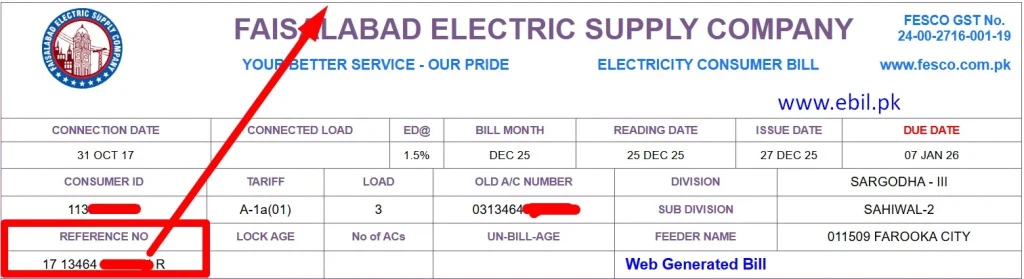
As an electrician, I have observed that many people in Pakistan do not receive their electricity bills on time. This problem is more common in villages because the postman leaves the bill at a nearby shop instead of delivering it to the consumer’s home. It can be stressful for anyone to visit a shop just to receive a bill and sometimes it gets lost.
To solve all these problems I have introduced an online billing system. On this page you can check FESCO online bill by reference number. Instantly download or print your FESCO duplicate bill and avoid late payments and extra charges.
What is the Fesco Online Bill
Fesco online bill is a duplicate copy of your Fesco electricity bill. If you lost your paper bill or it was never received, you can use an online tool to check, view or download your bill, it would be a duplicate copy of your bill, it has same value as a paper bill.
How to Check And Download FESCO Bill Online?
Steps to Check by reference number
This is the simple and easy method to view your Fesco online bill, you just need your reference number or consumer number. Let’s understand how to do this step by step!
- Open your browser and visit FESCO official website or ebil.pk/fesco-bill/
- Enter your 14-digit reference number or choose consumer id option and enter consumer ID.
- Click the check my bill button, the tool will search your bill from FESCO sources.
- Now click the button “open my bill.”
- That’s it, your bill is on your device screen, you can print or download it.
This duplicate bill has all the details that a paper bill has. You can use it for bill payment or any document proof. If you are from Multan or nearby and want to check your bill use MEPCO bill check Tool.
FESCO e-billing method to check
In this method, you need to register your mobile number or email with your reference number. If you did so you will get a monthly bill notification message with a due date in your inbox. You will also get notification of meter reading and consumed units so you can complain quickly if you notice any errors. Visit this blog “how to register FESCO SMS service” for more details on Fesco e-billing system.
How to download your Fesco Duplicate Bill in PDF?
People think there is only the “Print” option, but I want to tell you that you can download your bill easily in PDF. Let me clear in simple steps!
- When your bill appears on your screen, there will be a print button on top click on it.
- Chose save as PDF option from destination.
- Now click on Save button.
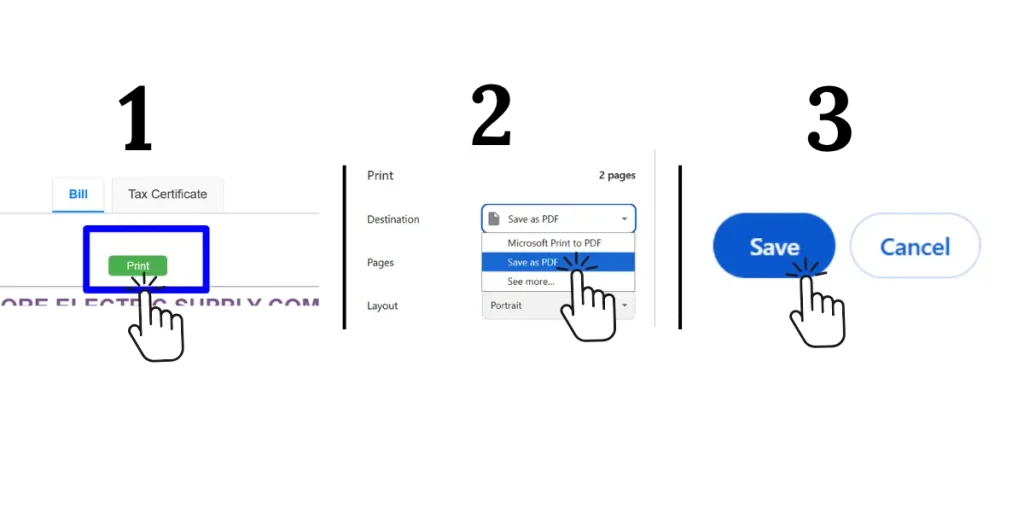
Congratulations! Your bill has been saved in your device. You can also directly print your bill just connect printer and choose the print option from destination.
Understand Charges & Taxes on your FESCO Bill
Look, the charges on your electricity bill, all are not from FESCO. Some charges are added by FESCO and some are government taxes. It is important to understand these charges, so you know where your money is going.
Charges Added by FESCO
|
FESCO CHARGES |
Details |
|---|---|
|
COST OF ELECTRICITY |
This is the cost of the electricity you use in a month. It is calculated by multiplying the units consumed by the unit price. |
|
METER RENT |
This is a fixed maintenance charge. It is added to your bill once a year. |
|
SERVICE RENT |
This is a monthly ongoing maintenance and service charge. |
|
FUEL PRICE ADJUSTMENT |
It is the adjustment of the fuel cost used to produce electricity in the previous month. |
|
F.C SURCHARGE |
The finance cost is an extra charge that helps the government pay back its loans. |
|
QTR TARRIF ADJ/DMC |
This charge is added every three months to adjust the electricity cost of the previous three months. |
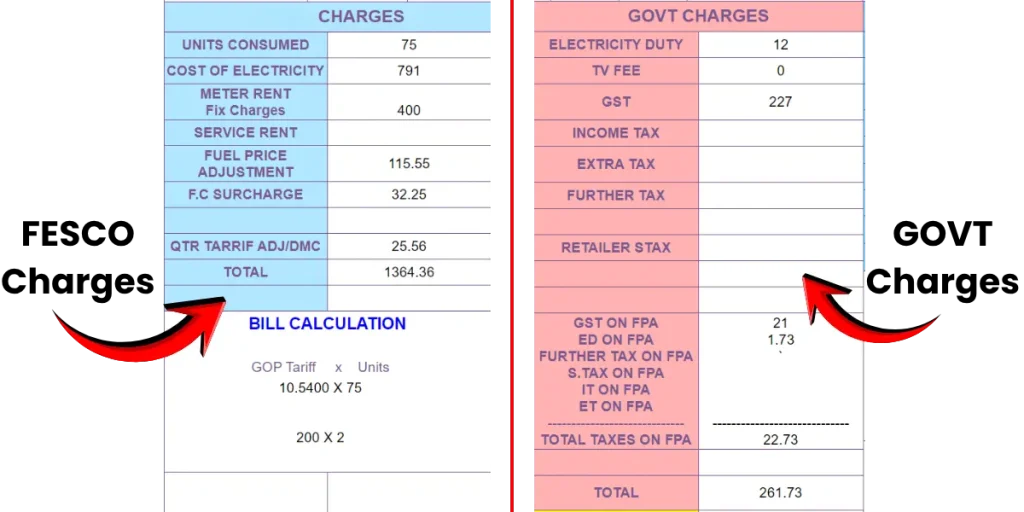
Government Charges on Your Bill
|
GOVT CHARGES |
Details |
|---|---|
|
ELECTRICITY DUTY |
This tax is added by the provincial government to support the operational costs of the power sector. |
|
TV FEE |
It is no longer added to your bill. |
|
GST |
A 17% GST (General Sales Tax) is applied to the total bill. |
|
INCOME TAX |
A 7.5% tax is applied to bills of Rs. 25,000 or above. |
|
EXTRA TAX |
It is a 5%–17% tax added to the bills of non-filer commercial or industrial consumers. |
|
FURTHER TAX |
A 3%–4% penalty tax is applied to consumers who are not registered with the FBR. |
|
RETAILER STAX |
This tax is added to commercial consumers who are not registered with the FBR. |
|
GST, ED & FURTHER TAX ON FPA |
The government also applies all the above taxes on FESCO charge FPA. |
To understand Mepco bill you should visit mepco bill
About FESCO
FESCO stands for Faisalabad Electric Supply Company. It is owned by the government of Pakistan, its main purpose is to supply electricity to homes, shops, factories and farms of central Punjab of Pakistan. FESCO works under the rules of NEPRA (National Electric Power Regulatory Authority) and follows the NEPRA Act 1997. It does not generate electricity itself but it receives from the national grid and delivers it to consumers safely.
Fesco is one the best electric supply companies of Pakistan. It has 04 circles, 21 divisions and 118 subdivisions. It has 5.8 million customers from its jurisdictional area with a population of 26 million. Its main service city is Faisalabad which is known as Manchester of Pakistan due to its huge textile and industrial sector.
FESCO Jurisdiction
FESCO supplies electricity to a very large population across central and western Punjab. There are 8 big districts in FESCO Jurisdiction including Faisalabad.
- Faisalabad district
- Faisalabad city, Jaranwala, Tandlianwala, Sadar, Chak Jhumra, and Sammundari
- Sargodha district
- Sargodha city, Bhalwal, Kot Momin, Bhera, Shahpur and Sillanwali
- Jhang district
- Jhang city, Ahmed pur sial, 18 hazari and shor kot
- Chiniot district
- Chiniot city, Bhuwana and Lalian
- Toba Tek Singh district
- Toba tek sing city, Gojra, Peer mahal and Kamalia
- Mianwali district
- Mianwali city, Piplan and Isa Khel
- Khushab district
- Khushab city, Naoshehra, Noorpur Thal, and Quaidabad
- Bakhar district
- Bakhar city, Kallur kot, Mankera, and Darya khan
Key Functions and Responsibilities of FESCO
FESCO performs many important duties to ensure smooth electricity supply. Below are some important responsibilities.
- Electricity Distribution
- Maintenance of Infrastructure
- Meter Reading, Billing and Collection
- New Electricity Connections
- Complaint Handling and Customer Support
- Load Management
- Anti-Theft and Legal Actions
FESCO Bill Payment Methods
FESCO gives many options to pay your electricity bill, both online and offline, you can choose what is easy for you. For online payment, you can use mobile wallets like JazzCash and Easypaisa, or banking apps such as UBL, HBL and other bank apps. If you prefer offline payment, you can pay your bill by visiting bank branches or post offices. For complete details and step-by-step guidance, please visit “How to Pay an Electricity Bill.”
How to Confirm Whether Your FESCO Bill Is Paid or Not?
After paying the electricity bill, many people feel worried. They think, “Did my bill really get paid or not?” People are also afraid that if the bill is not paid, the next bill may come with extra charges. To solve this problem, FESCO has started showing the payment status on the online bill.
When you check your bill online, you can also see the payment status. If your bill is already paid, you will see a red “PAID” stamp on the bill. This stamp appears below the meter picture on the bill. You will also see the date and time when the bill was paid. For clear understanding see the real screenshot given below.
Please remember:
It can take up to 48 hours for the payment status to update after you pay the bill.
Other Ways to Check Payment Status
You can also check your bill payment in other easy ways, such as:
- Payment history in your banking app.
- History of mobile wallet apps.
- SMS or confirmation message from your bank or app.
FESCO Peak Hours
To control electricity usage, FESCO has announced peak hours. The purpose of peak hours is to encourage people to use less electricity during busy hours. FESCO has also clearly informed users that if they use more electricity during peak hours, the electricity rate will be higher. Modern TOU / TOD electricity meters automatically record electricity usage during peak hours and share this data with FESCO.
From April to October:
🕡 6:30 PM to 10:30 PM
From November to March:
🕕 6:00 PM to 10:00 PM
Tips to Reduce Your Electricity Bill
I am sharing this from real experience, not from hearsay. If you really want to reduce your electricity bill, just do these simple things.
- First of all, use LED bulbs, not normal old bulbs.
- Always try to use energy-efficient appliances.
- During peak hours, use as little electricity as possible.
- When you are not in a room, turn off everything, lights, fan, AC, everything.
- When you are not charging your mobile or laptop, don’t just remove the cable from the device, remove the charger from the plug as well.
- If your pocket allows, try to use solar panels.
- If there is any wiring issue get it fixed immediately. This kind of fault wastes a lot of electricity.
- At night, when you are sleeping, keep unnecessary lights off.
Extension of Due Date & Bill Installments
FESCO also provides facilities of due date extension and bill installments to its customers. However, these facilities are not available online. To apply, you need to visit your nearest FESCO customer care center, such as the sub-division or division office in person.
Register & Track FESCO Complaints Online
If you have any problem like a wrong bill, power cut off, voltage issue, meter fault or any other, you can register and track your FESCO complaint online. To register your complaint you need to visit the official FESCO website and fill out the given form for complaint registration. After submission FESCO will give you a complaint ID which can be used to track your complaint status.
You can also call the FESCO helpline number (118 or 0800-66554) or send an SMS to 8118 to register your complaint. These multiple options make it easy for you to register your complaint without visiting the office. You can visit this blog post “how to register fesco complaints” for more details.
FESCO Helpline & Customer Support
Fesco gives useful ways to get support and solve problems with electricity service. The main contact is Helpline number 118 & UAN 080066554. You can also call +92-41-9220184 or +92-41-9220229 for help with wrong bills, power outage, meter issues etc.
📞 When to call helpline
- Your electricity bill is wrong
- You want to report load shedding or power failure
- You have meter reading or fault problems
- You need information about new connections or service problems
📌 Tip: Always keep your reference number ready before you call or visit so the staff can help you quickly.
Frequently Asked Questions
Conclusion
Checking your FESCO bill online is very easy and helpful. You can quickly view, download and print your bill anytime using your reference number. This saves time and helps you avoid late payments.
This website is not officially connected with FESCO or any government department. It only helps users check their bills using available online data. For official information or complaints, please visit the official FESCO website.