
How to Apply for a New Electricity Meter Connection in Pakistan (2026 Guide)
If you are thinking about a new electricity meter connection for your home, office, shop, industry, or agricultural property but don’t know how to apply, don’t worry, you have come to the right place. We are here to guide you through the process step by step. To get a new meter, typically you need to submit an application form along with proof of your identity, ownership documents, and the required fees.
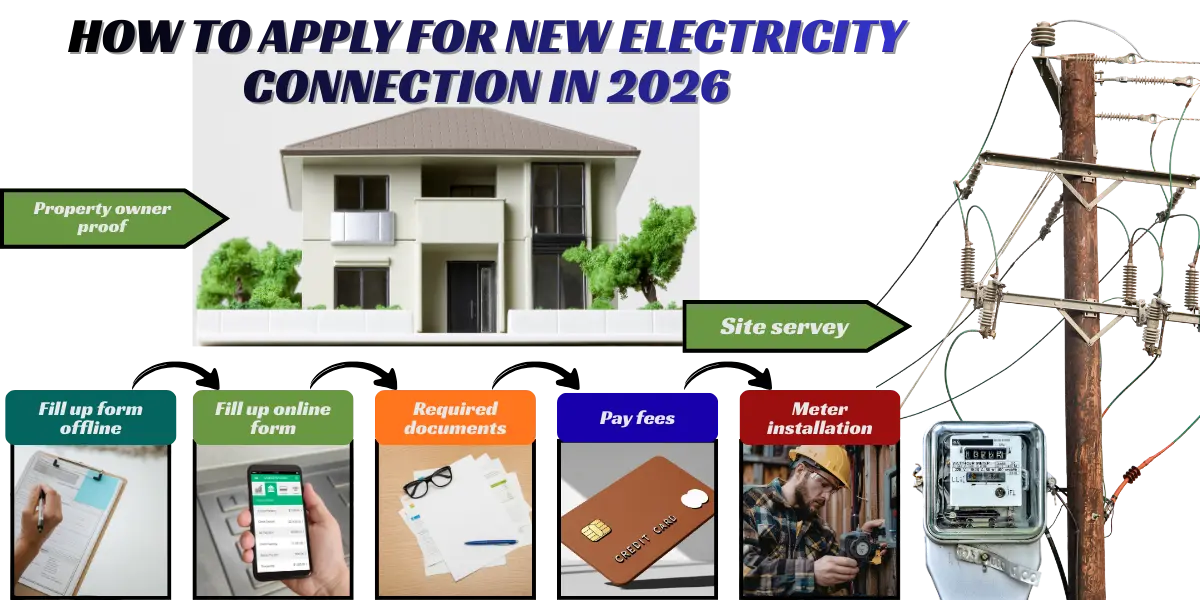
You can submit your application online through the official website or visit the local MEPCO, LESCO, FESCO, ISCO, and GEPCO Subdivision Board office. After submitting the application, you can easily track its status to stay updated on its progress. Following these simple steps will make getting your new connection fast and hassle-free.
What are the different types of connections?
Mepco offers various types of connections, such as
- Domestic or Single Phase (Home)
- Commercial or Three Phase (Shops, Office)
- Agricultural or Tube wells.
- Industrial.
- Temporary Construction.
Methods To Apply for a New Electricity Meter
There are two easy ways to measure an electricity meter.
1. Online Application:
In this digital world, applying online is the fastest way.
Fill Up Online Form:
The required items and details to fill the online application form are as follows:
- Go to your local electricity company website for Pakistan and press the ” Apply for New Connection option.
- Select the company name like (Mepco, Lesco, Gepco, etc.)
- Select your Subdivision name (Multan, DG Khan, Layyah, etc.)
- Enter the applicant’s name ( name of the person whose meter it is) and the father’s name
- Enter your CNIC number
- Fill in your address or the location where you live.
- Give your Email address if you have
- Enter contact number (mobile number).
- Add the meter number (if you already have a meter)
- required load (in kW or phase) as per your needs.
- Neighbour information such as Name, reference number, or home address
- Upload your original document copies, like your CNIC and proof of landlord/ownership.
- After you submit the form, just wait for the electricity board to review.
- When you have submitted the form, you will get a tracking code for your email or mobile phone.
After Online Form Submission:
- Copy all submitted documents, then prepare a file.
- Submit the file to your Local Subdivision Office.
- The survey officer, after conducting a site survey, will verify your application.
- The survey officer will conduct a site survey to verify your application
- Attach the demand notice with the test report and submit it to the bank with the required fees.
If you need any help during the application process, visit the Local subdivision website and contact HELPLINE.
2. Offline/In-Office Application:
Step to apply:
- Visit the subdivision office of your local electricity provider.
- Get an application form
- Fill in the application form with your personal details.
- Submit the completed form along with the required fees at your local office.
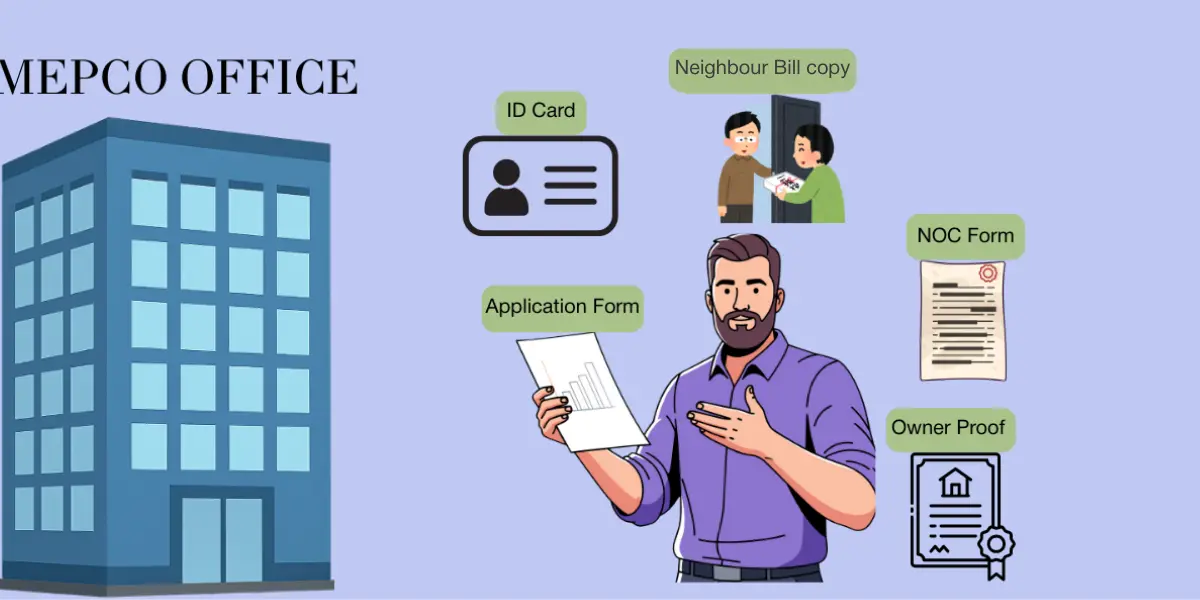
Documents required:
- Attach your necessary documents, like National Identity Card and ownership proof, Fard, allotment copy, and Wiring test report copy.
- Attach the form CNIC front and back copy.
- A copy of the NOC for the owner on stamp paper.
- Attach a copy of your neighbor’s electricity bill as a reference.
- Complete the form with all your data, then submit it to the office.
Common Reasons for Application Rejection
Common mistakes that may cause your application to be rejected
- Wrong National Identity Card (CNIC) number.
- Your Address mismatch.
- Wrong ownership proof/incomplete.
- The survey officer found some mistakes during the site visit.
- Incorrect load selection.
- Incomplete file.
What is the Demand Notice?
When you apply for a new electricity meter connection in WAPDA, you are required to pay a fee. This fee is called the Demand Notice. In this guide, we’ll explain everything you need to know about Mepco online demand notice, including how to check fees, pay them, download or print the notice, and track your demand notice online.
MEPCO Demand Notice Fee (2026 Updated Estimates)
| Large businesses/offices | Area / Type | Estimated Charges (PKR) | Notes |
| Residential – Single Phase | Rural/Urban | 9,000 – 9,500 | It has household load up to 3 kW |
| Commercial – Single Phase | Rural/Urban | 22,000 – 25,000 | Small shops / offices |
| Commercial – Three Phase | All | 100,000 – 160,000 | Large businesses / offices |
| Agricultural / Tubewell | Rural/All | 500,000 – 1,000,000 | Includes poles, transformer & wiring |
Note: These charges are not fixed and keep changing. For the latest updates, check the official MEPCO website.
Estimated Time for New Meter
The managing time for a new meter depends on its category and may take more time than expected. New electricity connections are divided into categories according to load capacity.
Category 1 (Up to 15 kW)
Total estimated time: 45 Days. Actually, the timeline can be different for each person because it depends on where you live, how busy the staff is, and how long the verification process takes.
Category 2 (16 to 70 kW/400 volts)
The process is similar to Category 1, but it includes a few extra checks and steps; therefore, the installation may take up to 70 days to complete
Category .3 (71 to 500 kW/400 volts)
The process for Category 3 is similar to Categories 1 and 2, with additional approvals due to a higher load. The only difference is that because the load capacity is higher and extra approvals are needed, the whole process can take longer, maybe around 90 to 100 days from the date of application.
How to Track New Connection Application Status
After submitting your MEPCO new electricity connection application, it’s important to keep track of its progress. You can easily check whether your application is under review, pending survey, or ready for installation.
For a step-by-step guide, visit check your application status.
Is It Allowed To Install Multiple Meters?
Yes, the Power Division has made it clear that you can apply more than one electricity meter at the same address, if you have a separate home with its own internal and external door and kitchen, even if it is on the upper floor.
If you want to install multiple meters, please visit the next page
FAQs
Final Words
A new meter installation may seem complicated at first, but by following the proper steps and submitting all the required documents, the process can be smooth and hassle-free. Remember, the timeline varies depending on your category, location, and load capacity.
Always double-check your application details to avoid delays or rejections, and if you’re planning to install multiple meters at the same address, make sure each unit meets the requirements. Be patient, follow the process carefully, and your new meter will be up and running in no time.


