Check MEPCO Bill Online and Download Your Duplicate Bill
Check Mepco Bill Here
If your electricity bill is lost or does not arrive on time, and you are confused about charges and surcharges, you are not alone. Many people face this problem. But now there is no more confusion because MEPCO has introduced an online billing system. Now it is very easy to check the MEPCO online bill using a mobile phone or computer
How To Check MEPCO Bill Online?
Follow these simple steps:
- Open the Mepco Official website or ebil.pk
- Enter 14- digit reference number or 10 consumer ID
- You can see the electricity bill with the payable amount and the due date
- Click on, view your full bill.
- Within seconds, you will see your latest full bill on your screen.
To download the Mepco duplicate bill in PDF, click on print and then choose “save as PDF” from the destination and save it. You can view and download your income tax certificate if you were paying income tax through your bill. If you are from the FESCO area and want to check your bill, use the FESCO online bill tool.
How Our Bill Checking Tool Works
1. Enter your reference number

2. Click on the check bill button

3. Click on ” Open My Bill ” and view your bill instantly
How to find the reference number
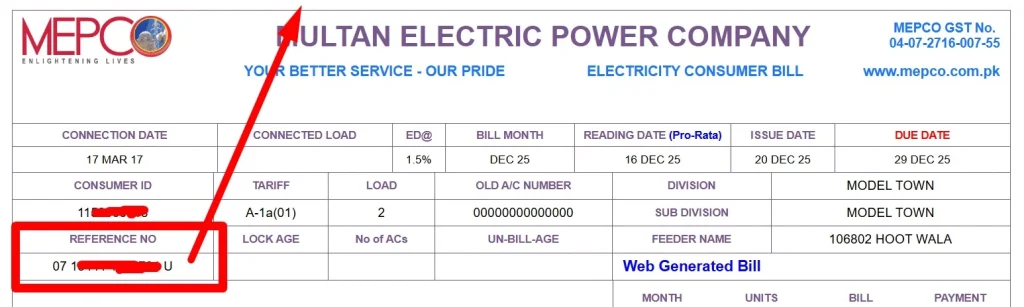
It is printed on your bill on the top right corner, below the consumer ID. It is a unique 14-digit and 1-letter number, something like this 12 34567 8910111 U. To check your bill, you just need 14 digits without a letter. The reference number is highlighted with a red rectangle on image below.
Why Choose ebil.pk?

Trusted Pakistan billing portal

Secure & private
All major Discos are supported

Fast & easy to use
What is A Mepco bill?
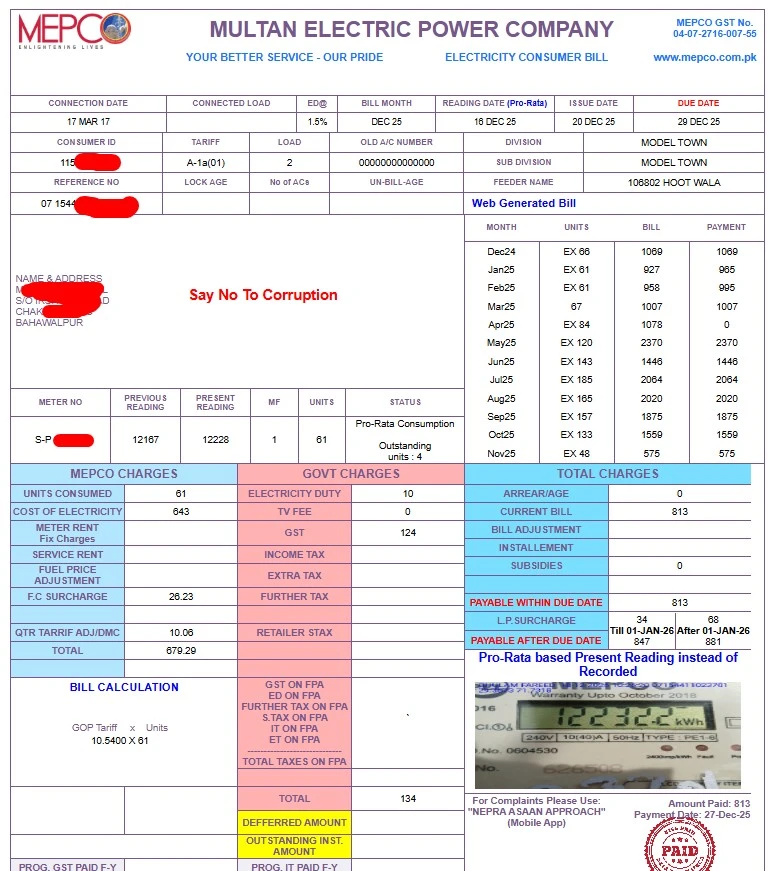
It is your monthly electricity usage invoice generated by MEPCO. It includes details like units consumed, total amount, due date, and various taxes or charges.
Understand charges on your Mepco electricity bill
Your electricity bill is not just about the units you use. It includes different types of charges added by MEPCO and the government. Understanding these charges can help you know exactly what you are paying for.
|
Charge Name |
Simple Explanation |
|---|---|
|
Electricity Cost |
This is the actual cost of the electricity you use. |
|
Meter Rent |
A fixed amount for maintenance and services once a year. |
|
TV fee |
This tax is not included anymore. |
|
Fuel Price Adjustment (FPA) |
If fuel prices increase or decrease in the previous month, the difference is adjusted in your current bill. |
|
Quarterly Adjustment |
Every three months, previous costs are reviewed and adjusted in your bill. |
|
GST |
A 17% government tax is applied to your total bill. |
|
Electricity Duty |
A provincial tax is used to support and improve the electricity system. |
|
Income Tax |
A 7.5% tax is applied to users whose bill exceeds a certain amount of 25000. |
About mepco
Multan Electric Power Company (MEPCO) is a bigest elecricity destribution company of Pakistan. It has 8.9 million customers, 159 grid stations, 1945 feeders, and 128239 kilometers of HT& LT lines. Its main function is to supply electricity, take meter readings every month, and generate & collect electricity bills.
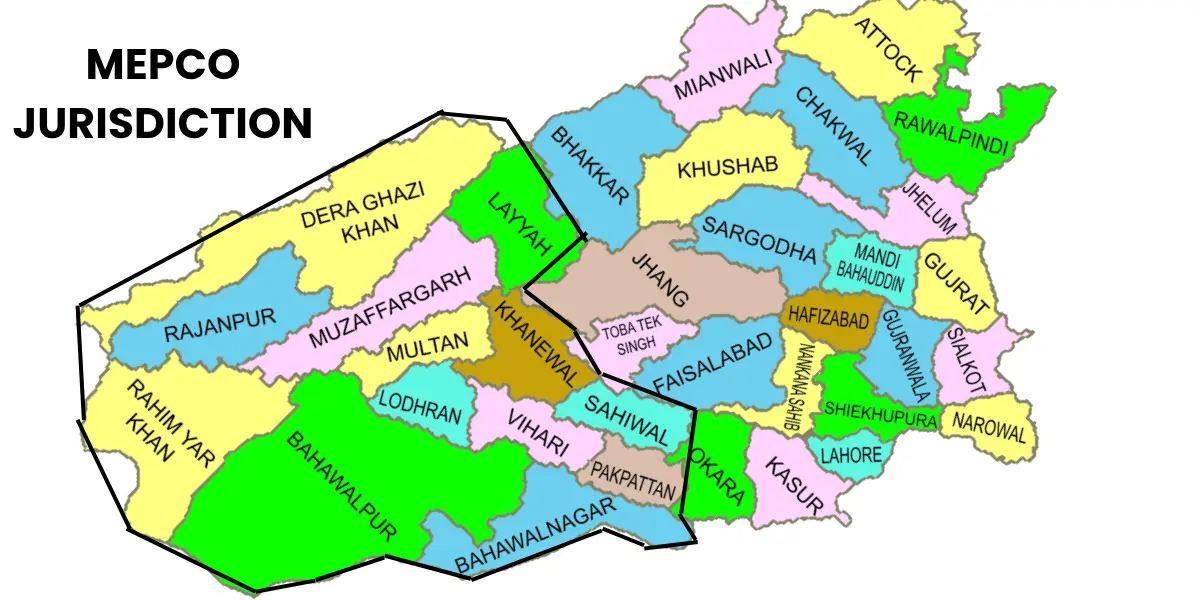
Areas Under Mepco
Mepco supplies electricity to the following 14 districts of South Punjab.
- Multan
- Muzaffargarh
- Bahawalpur
- Lodhran
- Rahimyar khan
- Vehari
- Kootadu
- Layyah
- Dera ghazi khan
- Khanywal
- Sahiwal
- Rajanpur
- Pakpatan
- Bahawalnagar
Mepco Helpline
The helpline is available 24 hours a day, so whether it’s a billing confusion, a power outage, or any complaint, you can get assistance quickly.
🏢Mepco Head Office Address
6F5X+PW4 Mepco Complex, Khanewal Rd, MEPCO Colony, Multan
📞 Main MEPCO Helpline Numbers
- 118 – General helpline (available 24/7)
- 0800-63726 – Toll-free number for complaints and information
- 0319-9757789 – cell phone number of Mepco head office, Multan
📍 City-Wise Mepco Helpline Numbers
If you prefer to contact your local office, you can use the numbers below:
- Multan: 061-9220198
- Bahawalpur: 062-9250102
- Rahim Yar Khan: 068-9230160
- Dera Ghazi Khan: 064-9239229
- Vehari: 067-3360282
- Muzaffargarh: 066-9200065
- Sahiwal: 040-9200305
- Khanewal: 065-2550026
- Lodhran: 0608-360128
- Layyah: 0606-413314
- Rajanpur: 0604-920092
- Pakpattan: 0457-352317
- Bahawalnagar: 063-9239031
TOU Meter and Mepco peak hours
According to the NEPRA tariff, TOU/TOD meters have been installed for all consumers whose connection load is 5 kW or more. They are now charged based on peak and off-peak hours. Therefore, use less electricity during peak hours and benefit from lower rates during off-peak hours. If your approved load is less than 5 kW, you can still apply for a TOU meter.
Mepco Peak and off-peak hours timing:
|
Season / Month |
Rush/ Peak timing |
Off rush/ Off Peak timing |
|---|---|---|
|
December to Feb |
05:00 to 09:00 (pm) |
The remaining 20 hours of the day |
|
March to May |
06:00 to 10:00 (pm) |
____ |
|
June to August |
07:00 to 11:00 (pm) |
____ |
|
September to November |
06:00 to 10:00 (pm) |
____ |
All consumers whose electricity usage is more than their approved load should contact their concerned subdivision/division and get their load approved (increased). With your cooperation, the department can better manage the required capacity of transformers, which can also reduce the chances of transformers getting damaged or burned. Remember, making changes in electrical equipment without approval or using more load than the approved limit is illegal. Your connection may also be disconnected.
How to Save Electricity and Reduce Your Bill
Here are some simple and real tricks that actually work. Small savings daily can save big monthly.
- Use energy saver LED light instead of a traditional bulb.
- Use appliances like the water pump, microwave oven, electric heater, and iron, etc., in off-peak hours.
- After charging the mobiles and laptop, unplug the charger.
- Turn off extra lights and fans.
- Use solar panels. They reduce your monthly bill a lot.
- Regularly check your electricity meter reading.
- Clean air conditioner filters every month to save power.
How To Pay Your Bill Online?
Now it’s easy to pay your electricity bill online; you can use a banking app, Easy Paisa, Jazz Cash, or official online platforms anywhere, anytime. For step-by-step instructions and complete details, visit how to pay the electricity bill.
New Connection or Transfer Procedure:
Apply for a new electricity connection or transfer an existing one in your name. MEPCO provides a clear process to help you complete your application easily and without delays. For more details, visit How To Apply For New Electricity Connection.
Frequently Asked Questions
Final Words
The MEPCO online bill system is simple and user-friendly if you know how to use it.
To make your life easier:
- Always keep your reference number safe.
- Use our free bill check tool for instant results.
- Download and print duplicate bills whenever needed.
- Pay your bills on the due date to avoid extra charges.
- Compare usage every month and control electricity waste.
Checking your bill online saves both time and stress. Whether you’re in Multan, Bahawalpur, Sahiwal or other districts, this tool works everywhere in Pakistan.